This TryHackMe room is rated medium difficulty, awarding 300 points upon full completion. We are given access to a virtual machine and two analysis artifacts: a Procmon CSV logfile and a PCAP file containing captured network traffic.
The room relies heavily on ProcDOT, a visualization tool designed to correlate process activity, file system operations, registry changes, and network traffic into an interactive graph. Throughout this lab, we will use the ProcDOT application provided with the VM to load and correlate both data sources, analyze the resulting graphs, and piece together the malware’s behavior step by step.
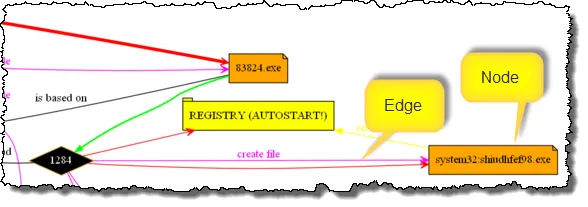
Also, the documentation for ProcDOT proved to be useful.
Table of contents
Open Table of contents
- Tasks
-
- 1. Provide the two PIDs spawned from the malicious executable. (In the order as they appear in the analysis tool)
- 2. Provide the full path where the ransomware initially got executed? (Include the full path in your answer)
- 3. This ransomware transfers the information about the compromised system and the encryption results to two domains over HTTP POST. What are the two C2 domains? (no space in the answer)
- 4. What are the IPs of the malicious domains? (no space in the answer)
- 5. Provide the user-agent used to transfer the encrypted data to the C2 channel.
- 6. Provide the cloud security service that blocked the malicious domain.
- 8. Find the PID (Process ID) of the process which attempted to change the background wallpaper on the victim’s machine.
- 7. Provide the name of the bitmap that the ransomware set up as a desktop wallpaper.
- 9. The ransomware mounted a drive and assigned it the letter. Provide the registry key path to the mounted drive, including the drive letter.
- 10. Now you have collected some IOCs from this investigation. Provide the name of the ransomware used in the attack. (external research required)
-
- Conclusion
Tasks
1. Provide the two PIDs spawned from the malicious executable. (In the order as they appear in the analysis tool)
First, load the file into ProcDOT from the ‘Monitoring Logs’ section. Then, under ‘Render Configuration’, click the three dots (…)
and wait for the analysis to complete. Once finished, a new window appears. At first glance, nothing seems unusual; however,
one process stands out with the name exploreer.exe. This is suspicious, as explorer.exe is a core Windows process. Searching for the process name reveals two separate processes:
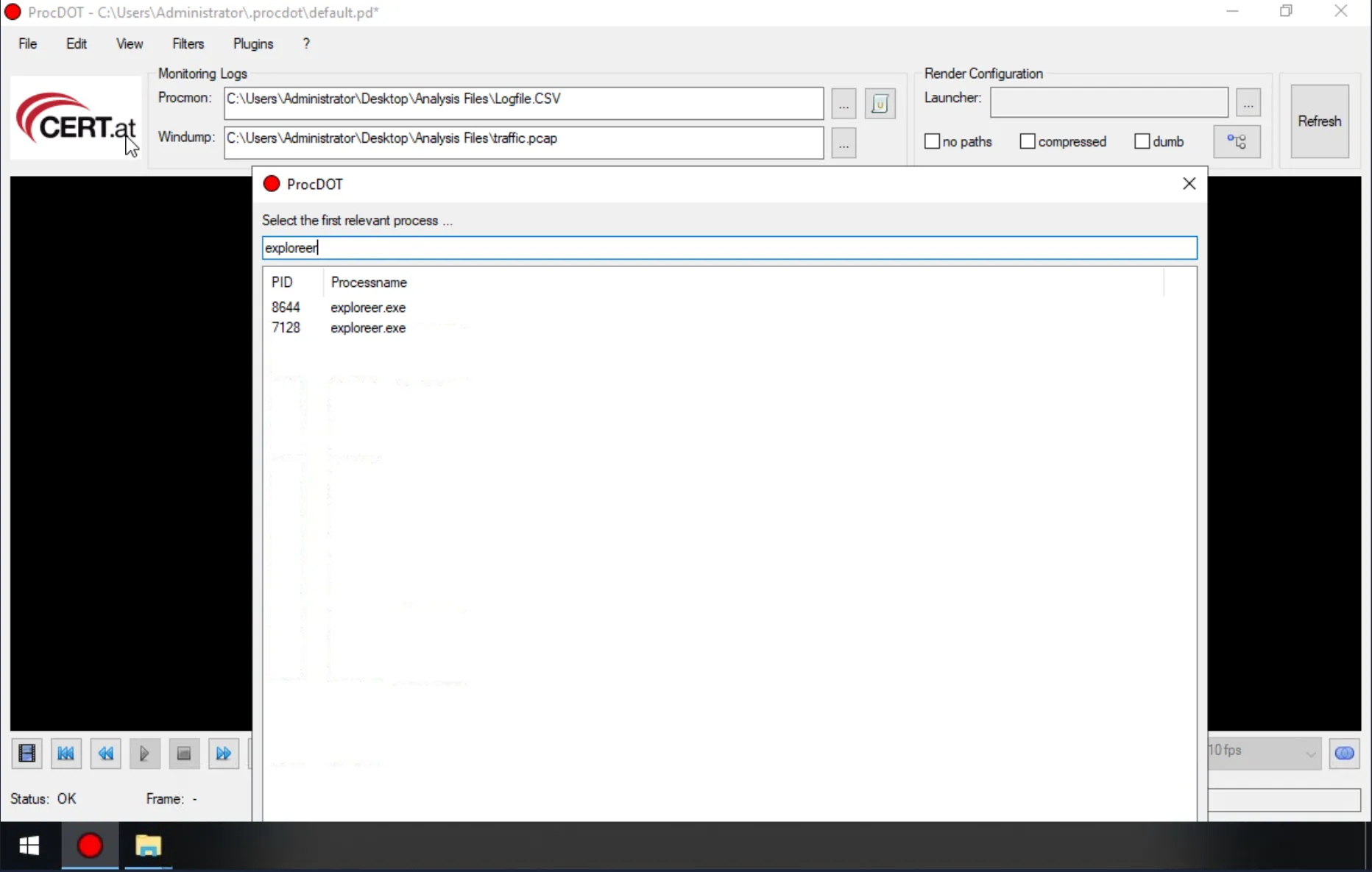
You can see process PID’s listed as well, which are the answers.
Answer: 8644, 7128
2. Provide the full path where the ransomware initially got executed? (Include the full path in your answer)
For a process to be created, its executable must first be initiated by another process. Therefore, it is necessary to identify the parent process responsible for starting it. Selecting the process with PID 4 (System) and clicking Refresh reveals this relationship.
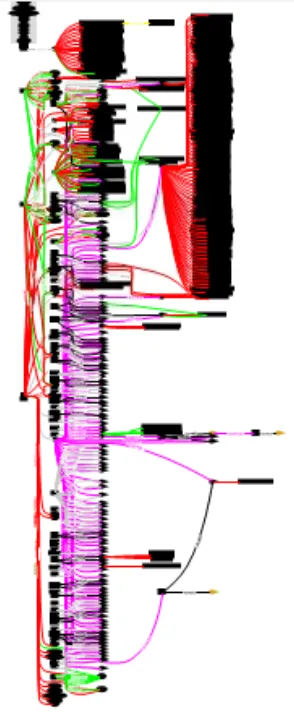
Search for exploreer.exe using Ctrl+F shortcut. Several results appear highlighted; however, a closer inspection is necessary to clearly understand the context.
In the provided VM, the (+) and (–) zoom shortcuts are unavailable, so zooming must be performed manually via View → Graph → Zoom In. After zooming in, a distinct red cell becomes visible.
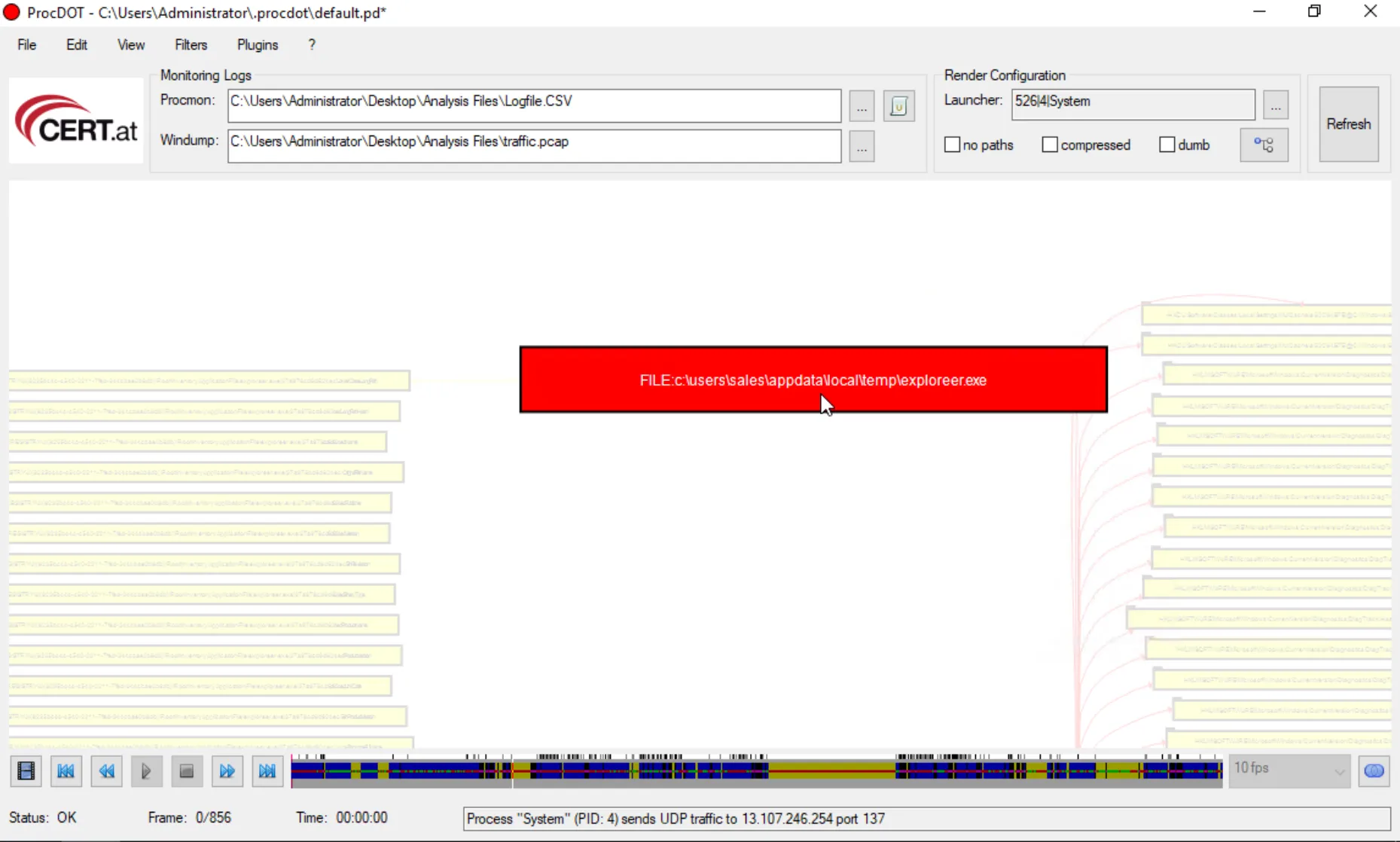
Answer: c:\users\sales\appdata\local\temp\exploreer.exe
3. This ransomware transfers the information about the compromised system and the encryption results to two domains over HTTP POST. What are the two C2 domains? (no space in the answer)
A review of the documentation indicates that URLs and domains are typically represented as blue cells. While multiple such cells are present, the focus should be on those initiated by the process under investigation. Slightly to the left on the graph, several notable entries become visible, all pointing to PID 7128:
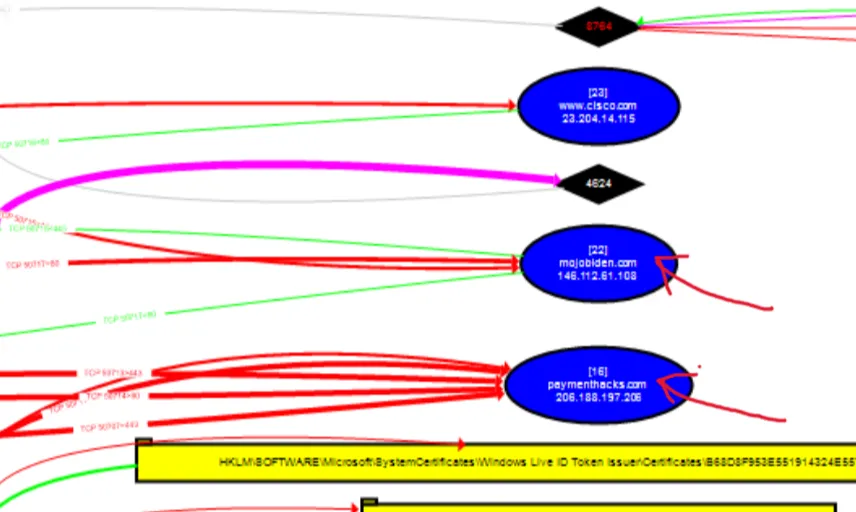
The domain cisco.com is unlikely to be a command-and-control endpoint, leaving mojobiden.com and paymenthacks.com as the primary candidates. To validate this assessment, both domains were submitted to VirusTotal. A detailed review of the results confirms the initial suspicion for each domain.
Answer: mojobiden.com,paymenthacks.com
4. What are the IPs of the malicious domains? (no space in the answer)
The IP addresses are visible on the cells as well.
Answer: 146.112.61.108,206.188.197.206
5. Provide the user-agent used to transfer the encrypted data to the C2 channel.
The user agent is not directly visible in ProcDOT; however, it can be obtained by opening the corresponding URL traffic in Wireshark or by following the TCP stream. Since ProcDOT’s built-in TCP stream view can be unreliable, opening the traffic in Wireshark is the preferred approach. This can be done by right-clicking the relevant cell and selecting “Open Packets in Wireshark.”,
This method is applied to paymenthacks.com.
From the previous analysis, the request method is known to be POST. Therefore, the following display filter is applied: http.request.method == "POST".

The second domain that returns results is then examined, and the corresponding TCP stream is followed.
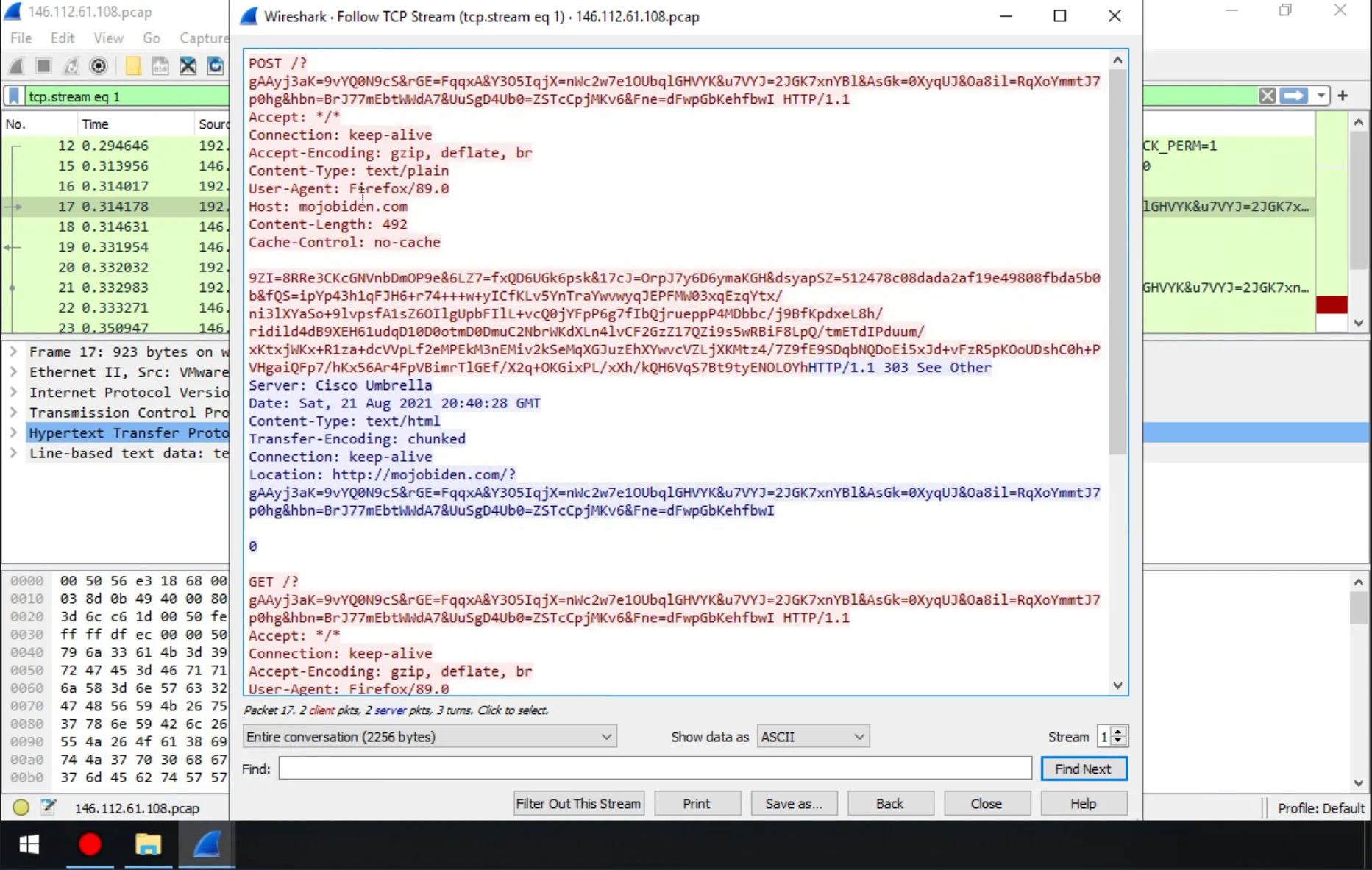
Answer: Firefox/89.0
6. Provide the cloud security service that blocked the malicious domain.
Recall why cisco.com appeared in the graph: the context is implied by the question itself. On the same screen, scrolling down
reveals that Cisco Umbrella blocked the malicious domain, returning an HTTP 403 Forbidden response.
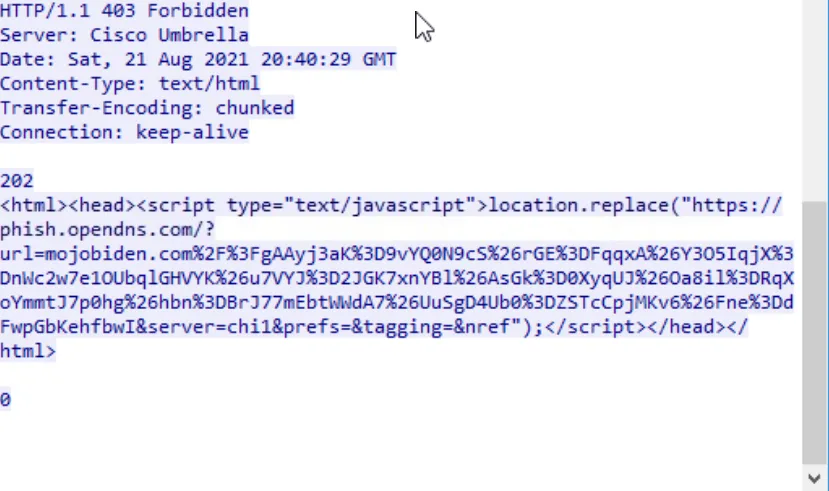
Answer: Cisco Umbrella
8. Find the PID (Process ID) of the process which attempted to change the background wallpaper on the victim’s machine.
Searching for the “wallpaper” keyword on the current graph yields no results. It is also important to note that, on a per-user basis, wallpaper settings are stored in
the Windows Registry under HKEY_CURRENT_USER\Control Panel\Desktop. To further investigate, the render configuration is changed to PID 7128 (exploreer.exe) to identify the
processes it initiated, followed by another refresh. A subsequent search for “wallpaper” then returns relevant results.
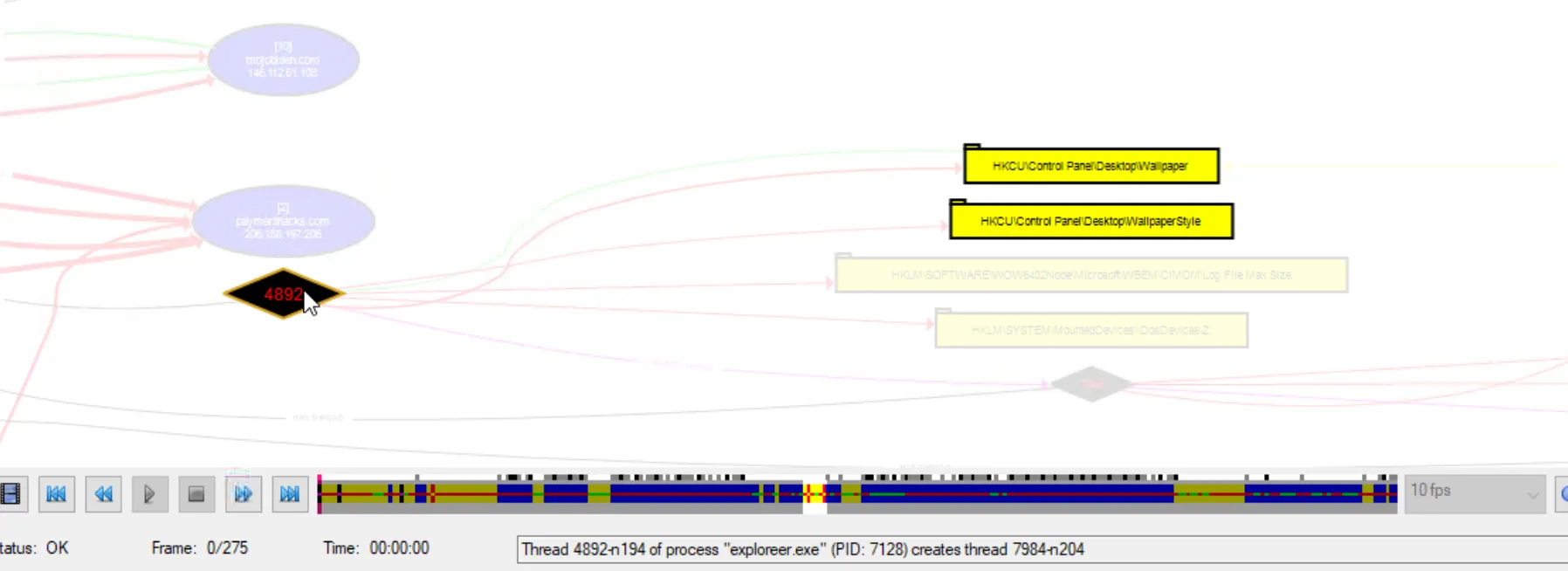
The analysis shows that this process attempted to change the background wallpaper on the victim’s machine.
Answer: 4892
7. Provide the name of the bitmap that the ransomware set up as a desktop wallpaper.
Question 8 was addressed before Question 7 because the registry entries and process ID are identified first and are immediately visible. However, to answer the current question,
the first registry cell must be right-clicked and Details selected. Under the Data key, clicking View reveals the corresponding value.
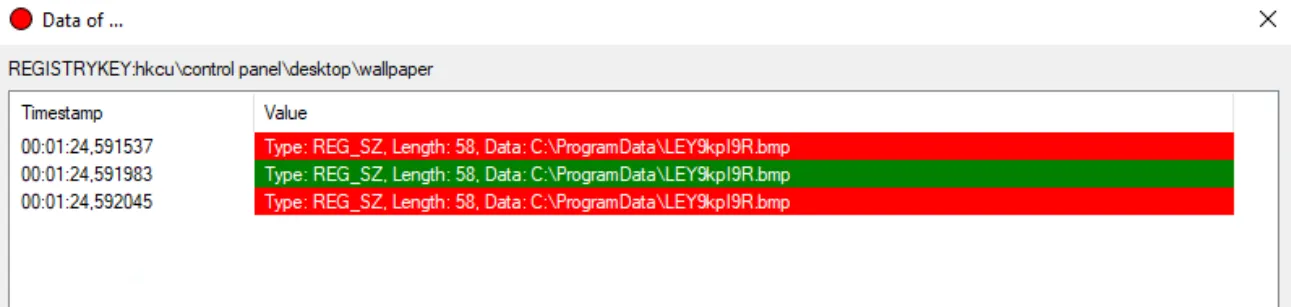
Answer: ley9kpi9r.bmp
9. The ransomware mounted a drive and assigned it the letter. Provide the registry key path to the mounted drive, including the drive letter.
The same process, with PID 4892, also modified another registry value related to mounting a drive and assigning it the letter Z:. This activity is visible on the graph
directly below the wallpaper-related registry cells.
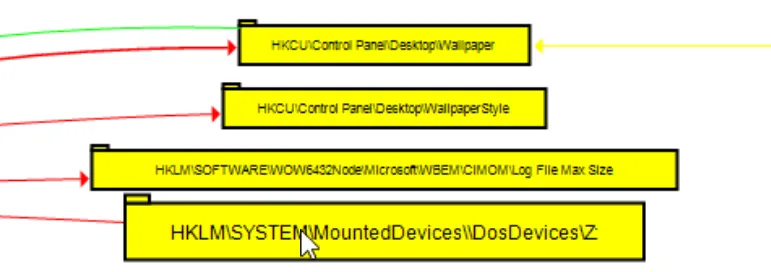
Answer: HKLM\SYSTEM\MountedDevices\DosDevices\Z:
10. Now you have collected some IOCs from this investigation. Provide the name of the ransomware used in the attack. (external research required)
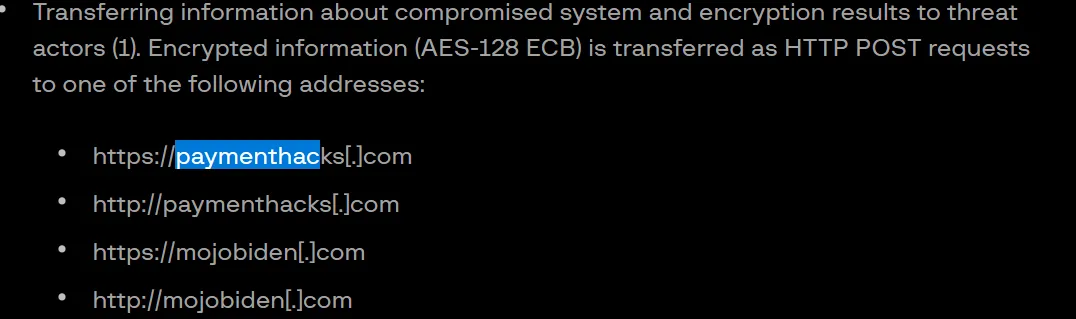
Earlier, the domains were also searched externally on VirusTotal. While reviewing the detailed results, an interesting pattern emerges: Google search results associated with each domain consistently reference paymenthacks.com. Opening the first search result redirects to the following article: https://www.group-ib.com/blog/blackmatter-ransomware/.
To verify the relevance, the domain is searched for within the page content, confirming that paymenthacks.com is explicitly mentioned.
Answer: Blackmatter Ransomware
Conclusion
Overall, this room significantly improved my research and analysis skills and introduced me to a powerful cybersecurity tool. ProcDOT is something I will definitely keep in my arsenal for future investigations.
Thank you for reading.☺️ Have a nice day.